

Accidentally deleted an important text or suddenly realized a message you need is no longer on your iPhone? You can be frustrated in such cases, whether the messages were removed intentionally, lost after an iOS update, or disappeared due to iCloud sync issues. You may want to know how to find deleted messages on iPhone.
No worries, your deleted messages aren’t always gone forever. There are several reliable ways to locate, restore, or recover missing texts, even those that appear to be permanently deleted.
- Table Of Contents
- Can You Recover Deleted Texts on an iPhone?
- 7 Ways to Recover Permanently Deleted Messages on iPhone?
- Method 1: Check the “Recently Deleted” Folder
- Method 2: Find Deleted Messages on iPhone Using Other Apple Devices
- Method 3: Recover iPhone Deleted Messages via iCloud Backup
- Method 4: Retrieve Deleted Messages by Resyncing iCloud Messages
-
Method 5: Recover Permanently Gone Messages on iPhone Using VigilKids

- Method 6: Ask the Other Person for the Conversation
- Common Misconceptions About iPhone Message Recovery
PART 1. Can You Recover Deleted Texts on an iPhone?
Yes, you can recover deleted texts on an iPhone, but only under specific conditions:
- You have an iCloud or iTunes backup.
- The message still exists on another synced Apple device.
- You use third-party text message recovery software.
If your current situation meets any one of the above three conditions, you have a greater chance of recovering deleted messages on iPhone devices. Next, we will detail seven useful methods for retrieving permanently deleted messages on iPhone.
PART 2. 7 Ways to Recover Permanently Deleted Messages on iPhone?
Many users thought that once a message is deleted, especially “permanently,” it can never be restored. However, real cases show that deleted messages can still be found through iCloud backups, synced Apple devices, or professional iPhone text message recovery tools.
Method 1: Check the “Recently Deleted” Folder
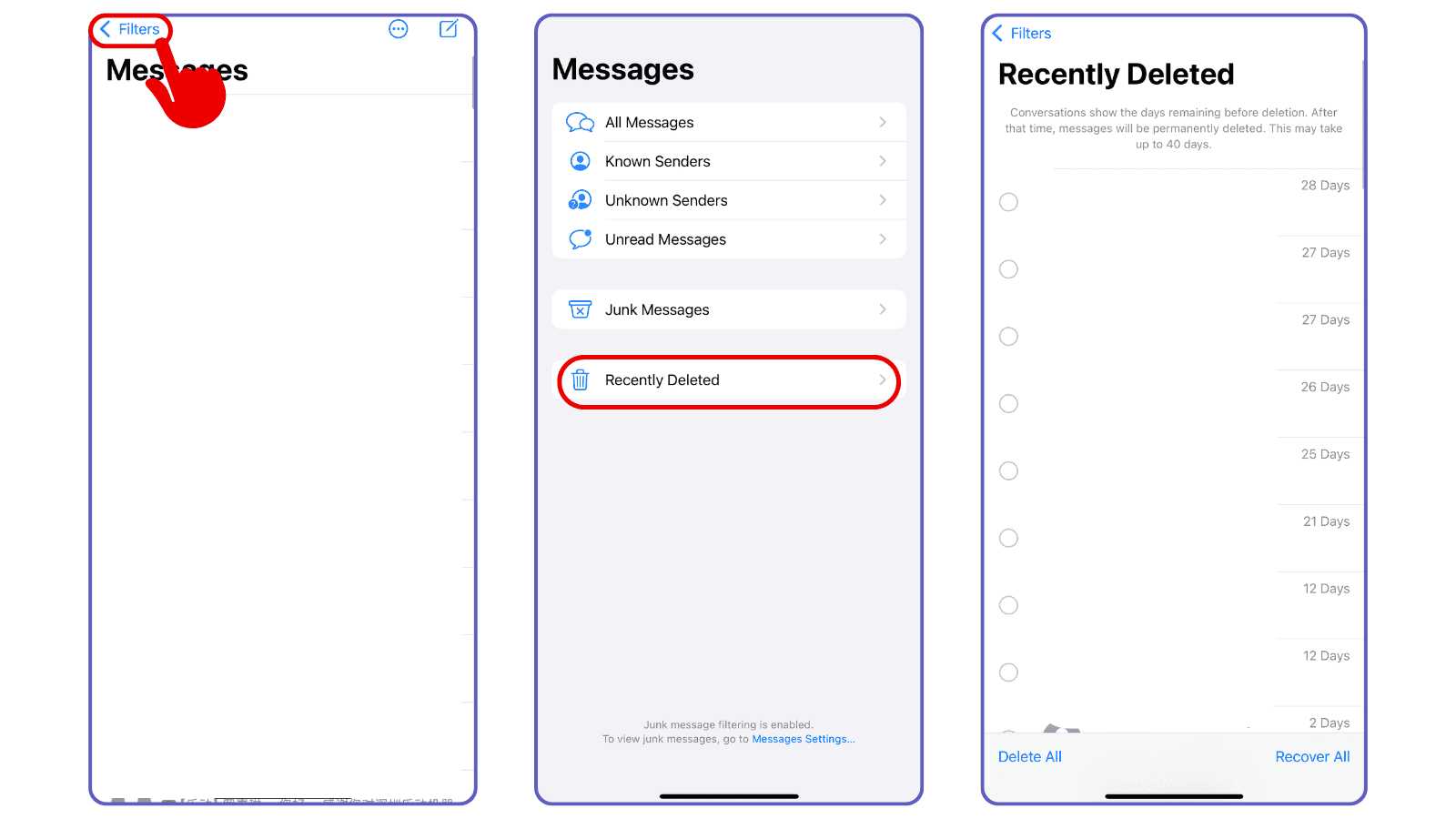
Apple provides the “Recently Deleted” feature to temporarily store deleted messages for 40 days before they are permanently erased. To access recently deleted messages:
- Step 1: Open the Messages app on your iPhone.
- Step 2: Tap Edit or Filters in the top-left corner (depending on your iOS version).
- Step 3: Select Recently Deleted.
- Step 4: Select the messages you want to recover and tap Recover to restore them to your main box.
User Experience:
"Open your messages! 3 lines right corner — I found messages my girlfriend had deleted. Even small fragments were still recoverable."
—— Tyspann, Reddit
Method 2: Find Deleted Messages on iPhone Using Other Apple Devices
Before trying advanced recovery methods, start with the simplest and most overlooked solution: checking your other Apple devices. Many users on Reddit reported that even after messages were permanently deleted on the iPhone, the same conversations were still available on their MacBook or iPad.
This happens because Apple devices sometimes fail to sync deletions instantly, especially when:
- Messages in iCloud is turned off, or
- The secondary device hasn’t been connected to Wi-Fi for a while.
So if you’re trying to figure out how to find deleted messages on iPhone, your older messages may still be safely stored on another Apple device’s Messages app.
The reason why this method works is that when Messages in iCloud isn’t enabled, each Apple device keeps its own local copy of your iMessages/SMS. Deleting a thread on your iPhone doesn’t always delete it on your Mac, iPad, or even an old device you no longer use but hasn’t synced recently.
Method 3: Recover iPhone Deleted Messages via iCloud Backup
If you had iCloud Backup enabled before your messages were deleted, this is one of the most effective ways to restore lost texts. iCloud stores a snapshot of your device, including Messages. By restoring your iPhone from an earlier backup, you revert the device to a previous state where the deleted messages still existed.
Steps to Restore Messages from an iCloud Backup
⚠️ Note: This process resets your iPhone to factory settings and restores everything from the backup.
- Step 1. Open the iPhone device.
-
Step 2. Go to Settings > General > Transfer or Reset iPhone.
- Tips: How to check if you have an iCloud backup? Firstly, open Settings on your iPhone. Tap Apple ID > iCloud > iCloud Backup. Lastly, check if the date of your last backup is earlier than when the messages were deleted.
- Step 3. Tap Erase All Content and Settings.
- Step 4. After the device restarts, follow the setup steps.
- Step 5. Choose Restore from iCloud Backup.
- Step 6. Select the backup that likely contains your deleted messages.
Method 4: Retrieve Deleted Messages by Resyncing iCloud Messages
If you're searching for how to find recently deleted messages on iPhone, one surprisingly effective trick—confirmed by multiple real users—is to force iCloud Messages to resync. Even messages that appear “permanently deleted” can sometimes reappear after refreshing your iCloud sync settings.
This method works because Apple keeps a copy of your synced messages in iCloud as long as they were uploaded before deletion. Manually toggling the sync forces your iPhone to redownload these stored messages.
Check how to resync iCloud Messages to retrieve deleted messages:
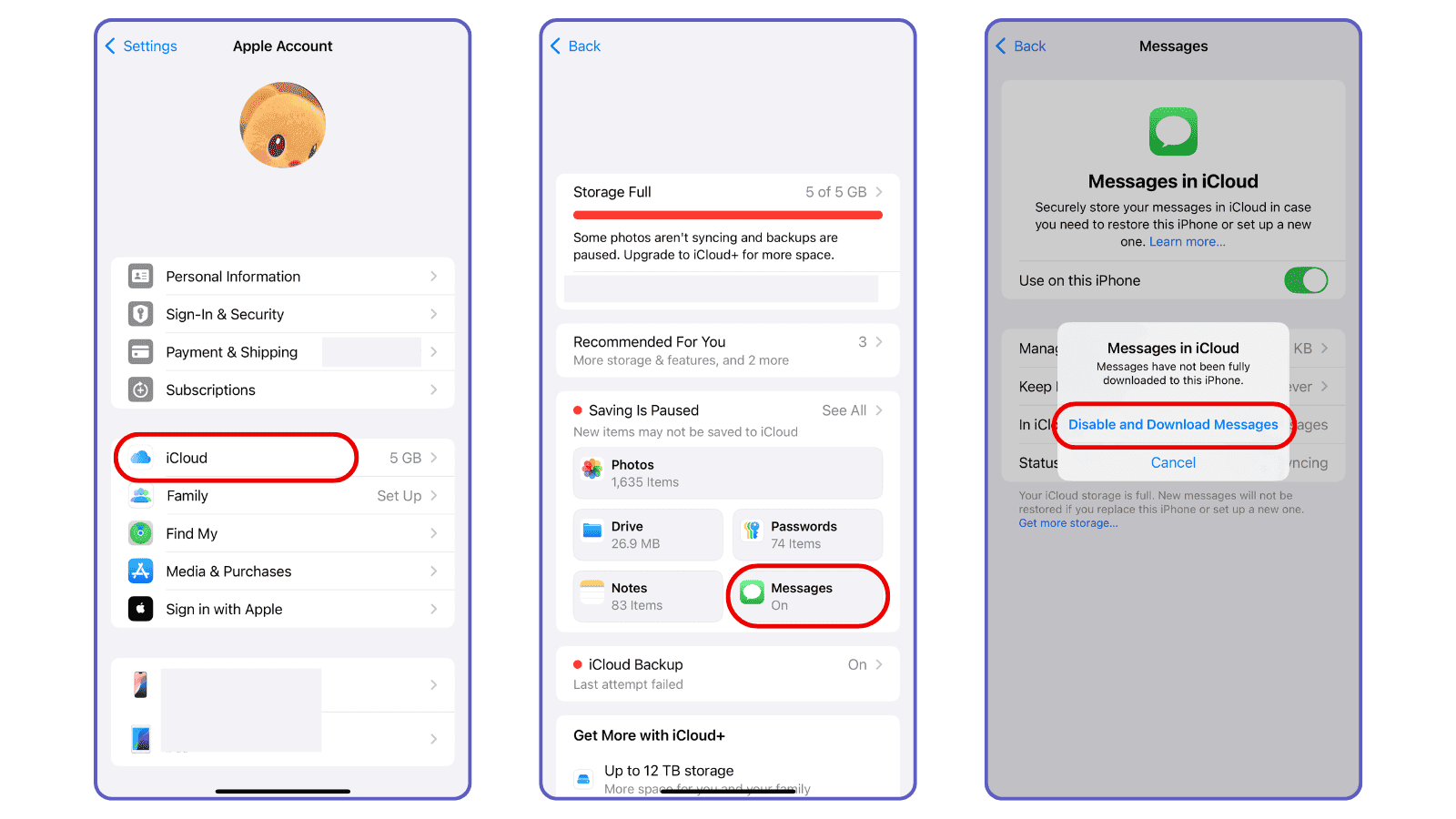
- Step 1. On your iPhone, open Settings > tap Apple ID (your name) > iCloud > Messages.
- Step 2. Toggle off Use on this iPhone.
- Step 3. When prompted, select Disable and Download Messages.
- Step 4. Restart your iPhone.
- Step 5. Go back to the same page and toggle Use on this iPhone back on.
Method 5: Recover Permanently Gone Messages on iPhone Using VigilKids

If you want to learn how to find deleted text messages on iPhone without resetting your device or losing your current data, using a trusted third-party recovery tool can be the most convenient and practical solution.
VigilKids is a professional parental control app to guard kids’ online safety, enabling users to see and recover deleted messages on phones. Instead of the phone’s Messages app, this text message tracker can also view WhatsApp chats, including sender, receiver, and sending time.
Key Features of VigilKids to Recover Deleted Messages
- You can easily trace everyday chats and deleted texts on the target phones.
- Track WhatsApp chats in real-time, including deleted and withdrawn messages.
- Remotely check the messages of others on your own phones.
- View and recover specific conversations.
- The setup process is simple and easy to use, delivering a smoother experience.
Steps to recover deleted messages on iPhone:
-
Step 1. Create Your VigilKids Account
- Visit vigilkids.com and click Try Now to create a new account (you can also directly sign in if you already have a VigilKids account).
- You can sign up by quickly logging in with a Google account or manually registering using your email and password.
-
Step 2. Connect Your Phone
-
1.On Your Device (Parent Dashboard)
- Log in to your VigilKids account at https://my.vigilkids.com.
- Click "Add Device" or "Bind My Device" to start setup.
- Follow the prompts to generate a unique pairing code — write it down or screenshot it.
-
2.On the Target iPhone (Child/Monitored Device)
- Install the VigilKids Assistant app at https://www.vigilkids.vip (the app will guide you through enabling necessary permissions).
- Enter the pairing code generated from your dashboard to link the device.
- Complete the setup by following the on-screen instructions.
-
3.Finalize Setup
- You can choose to hide the app icon to avoid accidental deletion or ensure silent running. Enable Location Services if you also want to track device location and route history.
-
1.On Your Device (Parent Dashboard)
-
Step 3: Start Viewing and Recovering Messages
Once the phone is connected, go back to your VigilKids dashboard's Messages tab. You can now:
- View all sent, received, and deleted SMS/iMessages
- Recover and copy deleted conversations
- Trace messages that were erased immediately after being deleted
- Monitor media files, voice notes, and app activity
To make setup even easier, you can also watch this YouTube video that walks you through the entire installation and setup process.
Method 6: Ask the Other Person for the Conversation
Sometimes the simplest solution is the most effective. If the deleted messages were part of a conversation with someone else, that person might still have a copy of the chat on their device. Asking them to share the conversation can save you from complicated recovery processes.
This method works best for one-on-one conversations. Group chats may be more complicated.
Common Misconceptions About iPhone Message Recovery
-
"Apple or my carrier must keep copies of my SMS/iMessages."
In reality, neither Apple nor carriers store your deleted message content. Apple only keeps metadata for routing iMessage; carriers usually cannot retrieve old SMS content either. -
"Police can recover any deleted message."
This is a misunderstanding. Law enforcement may access messages only through special forensic tools or direct backups obtained during investigations — methods unavailable to regular users. -
"Free recovery software is safe and effective."
Many free tools have low recovery rates and may overwrite existing data, making successful recovery even less likely. Using professional, reputable software like VigilKids significantly reduces this risk.
Q1: Can you recover messages older than one year without a backup?
Generally no, messages older than one year that don't have an iCloud or iTunes backup are almost impossible to recover.
Q2: How long are deleted messages kept in iCloud?
Deleted iMessages in iCloud can remain in the "Recently Deleted" folder for up to 40 days. After this period, they are permanently removed unless you have an older backup. iCloud users with large storage may have older messages available in backups.
Q3: Where are deleted iPhone messages stored?
When you delete a message on an iPhone:
•It first moves to the Recently Deleted folder (for 30 days).
•If permanently deleted, it is no longer stored on the device.
•Apple or carriers usually do not retain deleted messages, unless part of a legal or law enforcement investigation.
Q4: How to find deleted messages from "Recently Deleted" after 30 days?
Once the 40-day period in Recently Deleted has passed, messages are generally not recoverable directly from the iPhone. Your options include:
•Restoring an older iCloud or iTunes backup that contains the deleted messages.
•Using third-party tools like VigilKids, which can monitor messages before deletion.
Conclusion
Knowing how to find deleted messages on iPhone can be crucial, whether it's for personal reasons, legal matters, or keeping track of important conversations. As we've covered, there are multiple ways to recover deleted texts.
For messages older than a year or without any backup, recovery can be extremely difficult. Tools like VigilKids are particularly helpful because they let you trace SMS conversations, including deleted ones, without risking data loss.