

Which smartphones are best for recording a concert so the music actually sounds clear and not all muffled? Many phones work well for voice memos but struggle in live music, band rehearsals, or loud environments. If you've ever tried recording a show only to get distorted audio, you're not alone.
From iPhones to the android phone with best microphone, we highlight the top phone with microphone options for crisp, professional-quality recordings. Whether capturing vocals, instruments, or live gigs, these phones stand out in 2026 for truly capturing sound as it should be heard.
- Table Of Contents
- PART 1. What Makes a Phone Great for Sound Recording?
- PART 2. Top Picks Explained: Phones That Truly Deliver
- PART 3. Best External Mic Options for Phones
- PART 4. Tips for Getting the Best Recording on Any Phone
- Bonus: Stay Aware with VigilKids Without Being Intrusive

- Conclusion
Comparison Table: Best Phones for Sound Recording
| Phone Model | Audio Strengths | Ideal Use Case | Notes | Rating |
|---|---|---|---|---|
| iPhone 14 Pro | Stereo clarity, low distortion | Concerts, vocals | Best with Voice Record Pro app | ⭐⭐⭐⭐⭐ |
| LG V60 ThinQ | 5 mics, manual gain, limiter | Drums, rehearsals | Built-in pro recording tools | ⭐⭐⭐⭐⭐ |
| Huawei P20 Pro | Handles loud volume well | Gigs, live venues | Older, but still outperforms many | ⭐⭐⭐⭐ |
| Samsung Galaxy S9 | Balanced stereo, low noise | Practice, field recording | Surprisingly consistent | ⭐⭐⭐⭐ |
| OnePlus 10T | Clear near speakers, minimal clipping | Rock concerts | Good budget option | ⭐⭐⭐⭐ |
| Pixel 8 Pro | Decent in quiet settings | Casual voice, journaling | Distorts in loud scenes | ⭐⭐⭐ |
PART 1. What Makes a Phone Great for Sound Recording?
Most modern phones can technically record sound — but few are built to handle loud, dynamic environments like concerts or rehearsals. Here's what sets the best apart:
- Microphone array design: Phones with multiple mics (e.g., 3–5) tend to capture better stereo image and reduce distortion at high volumes.
- High SPL tolerance: The best phones handle sound pressure levels without clipping—essential for drums, amps, or live bands.
- Minimal audio processing: Noise cancellation and auto-gain can ruin music recordings. Phones that allow "raw" capture (or work well with third-party apps) win here.
- Manual controls or recording modes: Built-in audio apps that offer limiter, gain control, or EQ filters (like LG's) give you far more flexibility than default recorders.
PART 2. Top Picks Explained: Phones That Truly Deliver
📱 iPhone 14 Pro
One of the most reliable phone with microphone capabilities for recording vocals, acoustic instruments, and even live gigs. It shines when paired with apps like Voice Record Pro, which unlocks stereo recording and 24-bit WAV files. Many users report using these recordings in actual releases.
Pros: Clean stereo, great noise handling, works well out of the box
Cons: Native Voice Memos app records in mono by default
Best for: Singers, mobile creators, live performers
📱 LG V60 ThinQ
An underground favorite among audio nerds. As an audio recorder smartphone, the V60 features five microphones and a manual recording app built into the system, allowing it to handle everything from outdoor percussion to studio-level rehearsals. Features like limiters and low/high-pass filters are rare at this level.
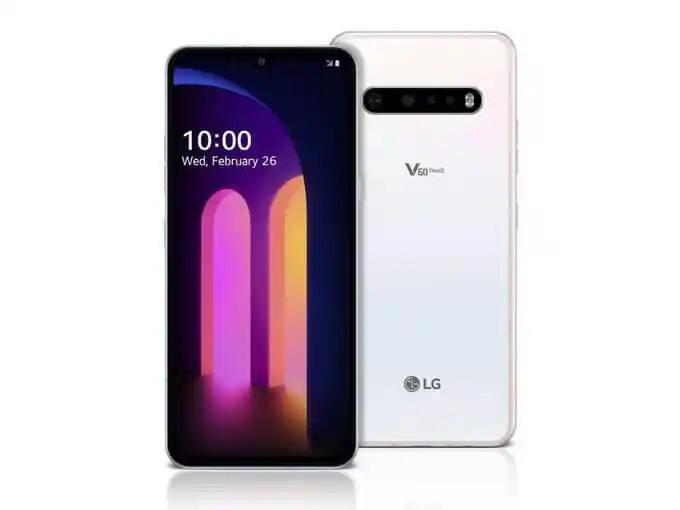
Pros: Incredible raw audio quality, pro-level features, very little distortion
Cons: Hard to find (discontinued), no longer supported
Best for: Musicians, drummers, field recorders
📱 Huawei P20 Pro
This 2018 flagship surprised users with its excellent concert recordings, making it a strong contender for an android phone best sound quality. It handles loud environments gracefully, producing recordings with depth and detail even in echo-heavy venues. Though newer Huawei models have downgraded in this area, the P20 Pro remains a solid pick if you can find it.
Pros: Excellent with live sound, stereo separation holds up
Cons: Older software, newer Huawei phones aren't as good
Best for: Loud gigs, rock concerts, crowd scenes
📱 Samsung Galaxy S9
While Samsung's newer models focus more on camera than audio, the Galaxy S9 remains a dependable device for mobile sound capture. It's especially handy for casual music work, voice memos, or jam session references.
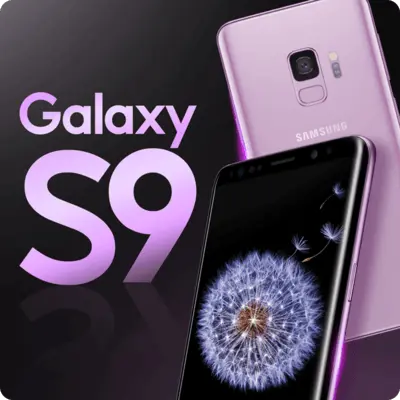
Pros: Balanced stereo pickup, low compression artifacts
Cons: Aging hardware, later Samsung phones have worse AGC
Best for: Band practice, street musicians, everyday use
📱 OnePlus 10T
Often overlooked, this android phone with best microphone handles loud sound near PA speakers better than many other models. Though it lacks deep recording settings, the mic hardware holds up well against distortion. Some users report decent results even at high decibel levels.
Pros: Low distortion near amps, good stereo clarity
Cons: Basic recording app, no manual control
Best for: Gig-goers, noisy rehearsal spaces
📱 Pixel 8 Pro
A modest improvement over Pixel 7 Pro, this device is usable for low to mid-volume scenarios like interviews or note-taking. But when pushed—especially during concerts—it quickly hits distortion and can ruin recordings.
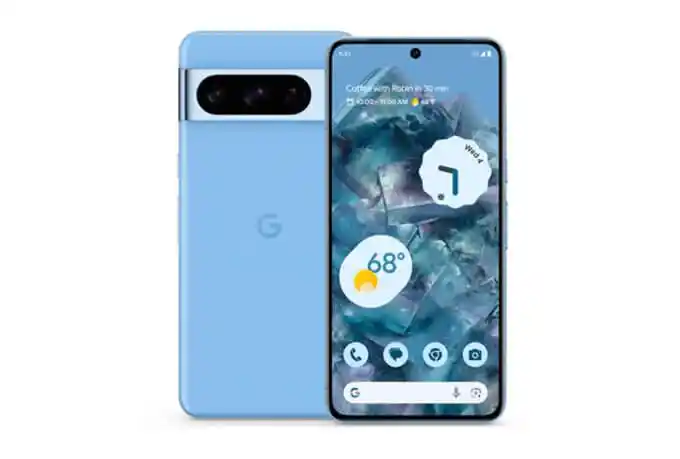
Pros: Acceptable in quiet environments
Cons: Poor high-volume handling, still no pro audio tools
Best for: Journalists, voice memos, casual recordings
PART 3. Best External Mic Options for Phones
If you're serious about sound, even the best phones can benefit from a good external microphone. These plug-and-play options give you better range, control, and clarity—especially in dynamic or noisy environments.
Shure MV88+
Type: Stereo condenser mic (USB-C or Lightning)
Best for: Concerts, music covers, podcasting
Why it's good: Includes ShurePlus MOTIV app for input gain, EQ, compression, and stereo width adjustments.
Power: Draws from the phone; no external power needed
Behringer Clip Mic Digital
Type: Budget alternative to MV88+ (~$45)
Best for: Entry-level creators, students
Why it's good: Clean audio, works with most phones, and highly portable.
Hi-Q MP3 Recorder / Open Camera (Android Apps)
Best for: Disabling auto gain control (AGC), recording unprocessed audio
Why it matters: Some phones (like Samsung A-series or LG Velvet) produce distorted sound because AGC boosts volume too aggressively. These apps give back control.
OTG Audio Interfaces
What it is: Small USB sound cards you plug into your phone via OTG
Best for: Connecting professional mics or mixers to your phone
Tip: Works best with Android devices and audio apps that allow custom input selection.
PART 4. Tips for Getting the Best Recording on Any Phone
Even if you're not using a top-tier phone, these tweaks can drastically improve your results:
1. Don't Use the Default Recorder App
Stock voice memo apps are optimized for speech, not music. Use third-party apps like:
- Voice Record Pro (iOS)
- Hi-Q MP3 Recorder (Android)
- Dolby On, Audio Evolution Mobile Studio, or BandLab for more serious recording.
2. Disable Auto Gain Control (AGC)
If your phone allows it (or through apps like Open Camera), turn off AGC. This prevents the mic from pumping up quiet sections and blowing out loud ones.
3. Avoid Close Proximity to Loud Sources
Never place your phone too close to drums, amps, or PA speakers. The small mics can't handle extreme SPL. Step back a few feet for cleaner results.
4. Use Video Mode (if Audio Mode Fails)
Strangely, some users find that recording video provides better sound than the audio app. This may be because the video recording bypasses certain processing or uses different mic combinations.
5. Experiment with Mic Placement
The difference between usable and distorted audio often comes down to positioning. If possible, elevate the phone, use a tripod, or bounce sound off walls to avoid direct overload.
Bonus: Stay Aware with VigilKids Without Being Intrusive
If you're a parent trying to stay connected with your child's digital world—especially during online classes, social interactions, or solo phone use—tools like VigilKids offer smart, non-invasive ways to monitor activity and audio, helping you ensure safety while respecting privacy.

VigilKids Live Monitoring Includes:
- Surrounding Recording : Hear what's happening around the child's phone in real-time
- Screen Recorder: See what they're watching or interacting with
- Remote Camera Access: Get real-time visuals for peace of mind
Whether checking in during a band rehearsal, after-school hangout, or solo phone use, VigilKids helps you stay gently in the loop—without interrupting your child's world.
Whether you're checking in during a band rehearsal, after-school hangout, or just want to make sure everything's safe, VigilKids helps you stay gently in the loop—without interrupting their world.
Conclusion
While no phone can fully replace a dedicated recorder like the Tascam DR-40X or Zoom H4n, some phones with microphone capabilities come surprisingly close—especially when paired with the right app or external mic. For those wondering which smartphones are best for recording a concert so the music actually sounds clear and not all muffled, iPhones and LG's V-series remain top-tier, while select older Samsung and Huawei models still deliver solid performance. Android enthusiasts should look for an android phone with best microphone to capture professional-quality sound.
And remember: recording is about capturing the moment, not chasing perfection. Tools like VigilKids can also help parents monitor audio safely and non-intrusively, ensuring you stay connected while respecting privacy.